User Payment Management
Overview
User Payment Management in the Membership Organization (MO) system provides administrators with comprehensive tools to monitor, manage, and troubleshoot user payment processing. The system is organized into three main areas: User Charges, Debit Batches, and Debit History. This document outlines the key flows and functionalities available for payment management, following the complete payment lifecycle from individual charges to batch processing and historical tracking.
User Charges
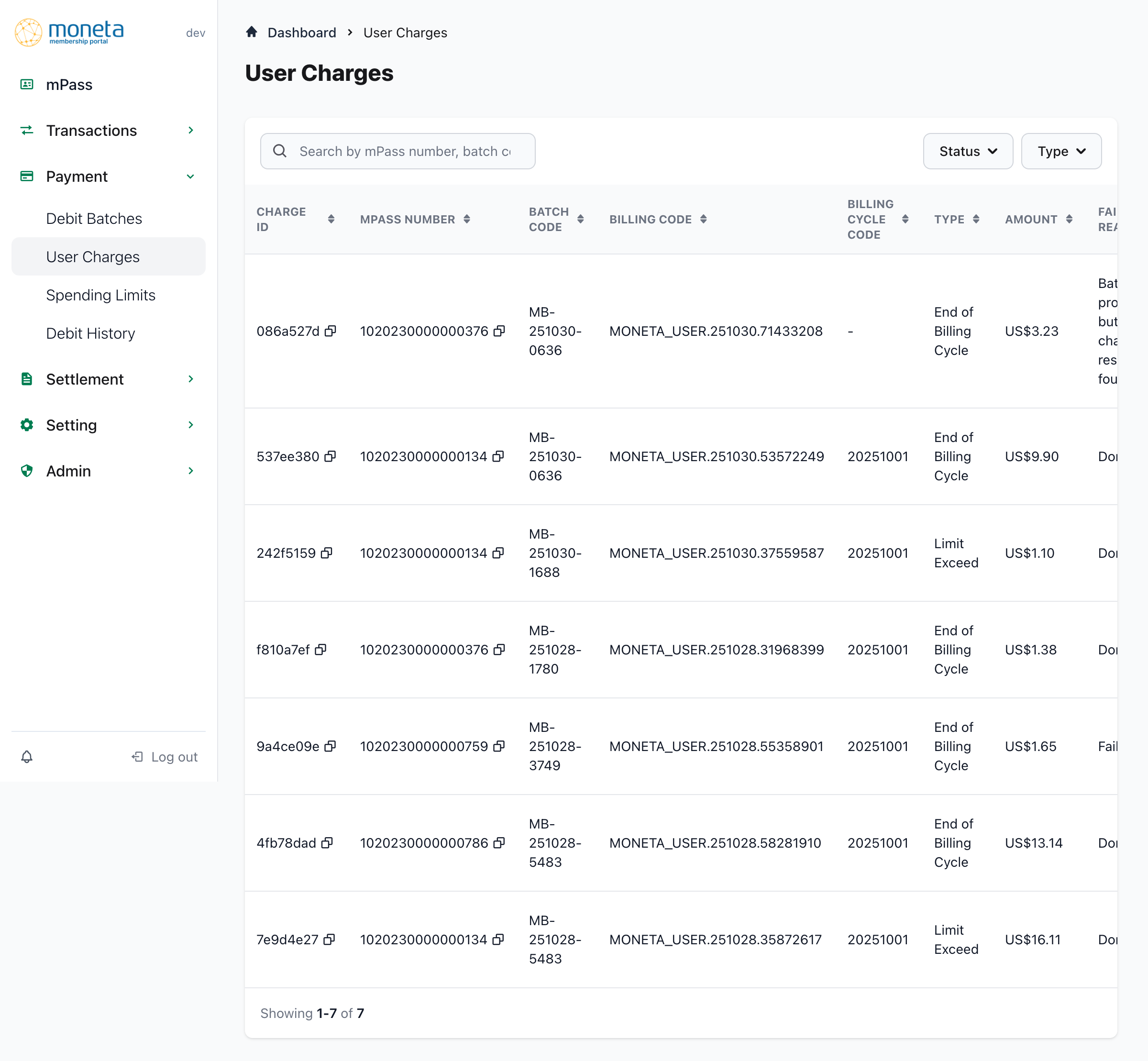
The User Charges view provides detailed visibility into individual charge attempts within the membership organization. This is the primary interface for monitoring charge-level activity and includes comprehensive tracking of payment attempts, retries, and status updates.
1. Navigation and Breadcrumbs:
- Breadcrumb navigation: Shows current location within the system hierarchy
- Page title: "User Charges" clearly identifies the current view
- Sidebar navigation: Quick access to other payment management sections
2. Search and Filtering:
- Search functionality: Find charges by mPass number, batch code, or billing code
- Status filter: Filter charges by current status (Temp rejected, Finalized, Permanent rejected)
- Type filter: Filter by charge type (End of Billing Cycle, Limit Exceed)
- Real-time filtering: Immediate results as filters are applied
3. Charge Details Table:
The comprehensive table displays detailed information for each charge attempt:
Core Identifiers:
- Charge ID: Unique charge identifier with copy functionality for easy reference
- mPass Number: User's mPass identifier with copy functionality
- Batch Code: Associated batch identifier (e.g., MB-251030-0636)
- Billing Code: Specific billing transaction code
Charge Information:
- Billing Cycle Code: Associated billing cycle (e.g., 20251001) or "-" if not applicable
- Type: Charge category:
- "End of Billing Cycle": Regular billing cycle charges
- "Limit Exceed": Spending limit related charges
- Amount: Charge amount displayed in USD format (e.g., US$3.23)
Processing Status:
- Failed Reason: Detailed failure explanation when applicable:
- "Batch processed but charge result not found"
- "Done" for successful charges
- "failed" for permanently failed charges
- Retry Count: Current retry attempt vs. maximum allowed (e.g., "1 of 3", "2 of 3")
- Status: Current charge status with visual indicators:
- "Temp rejected": Temporary failure, eligible for retry
- "Finalized": Successfully processed and completed
- "Permanent rejected": Permanently failed, no further retries
Timestamps:
- Created At: Charge creation date for tracking and auditing purposes
4. Charge Management Features:
- Row selection: Click on any charge row to view detailed information
- Copy functionality: Easy copying of charge IDs and mPass numbers
- Status tracking: Real-time status updates and change tracking
- Retry monitoring: Clear visibility into retry attempts and remaining attempts
5. Table Navigation:
- Pagination controls for browsing through multiple pages of charges
- Shows current results count (e.g., "Showing 1-7 of 7")
Debit Batches
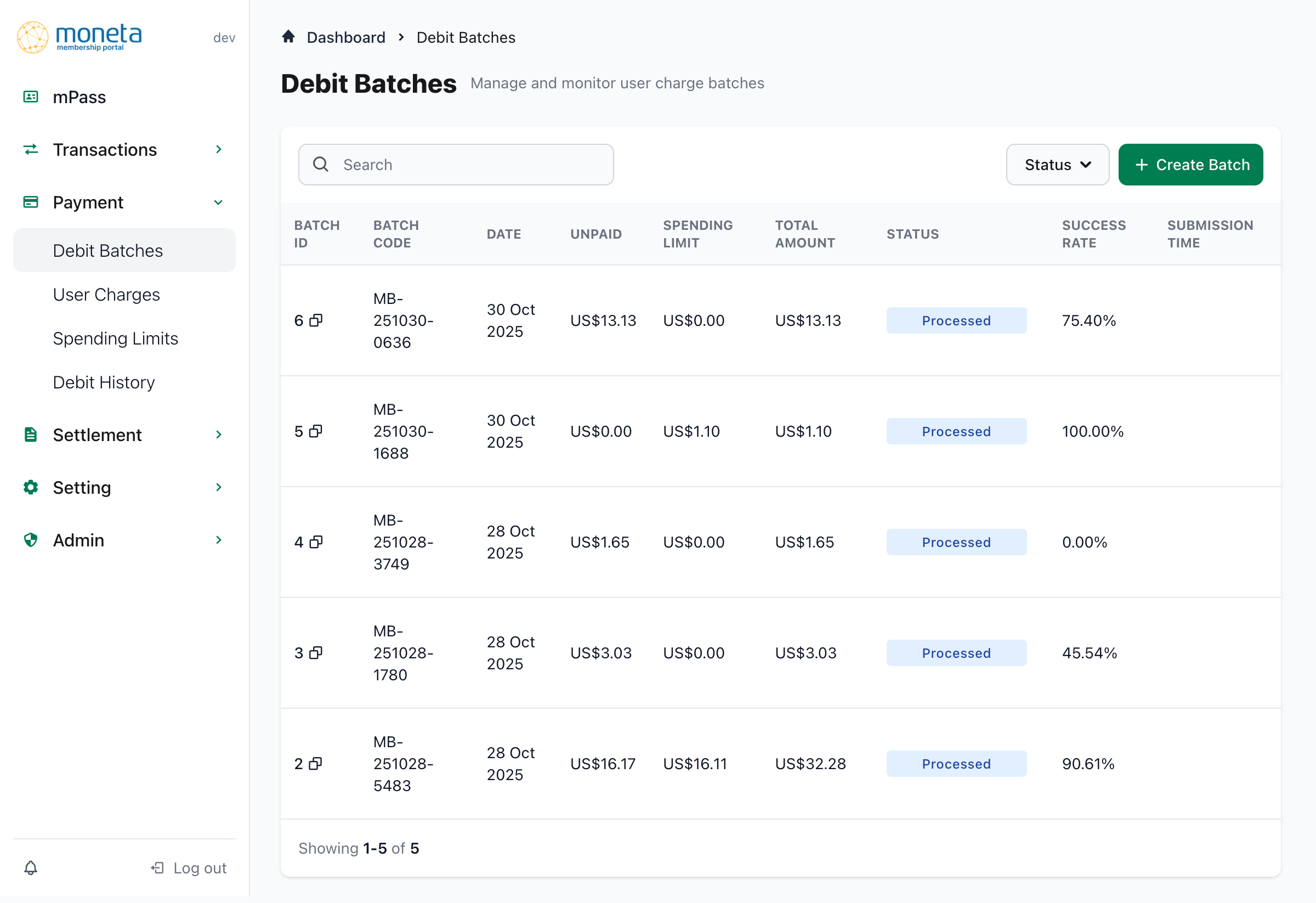
The Debit Batches section provides batch-level management and monitoring capabilities for payment processing. This view enables administrators to manage collections of payment attempts, track success rates, and create new batches for processing.
1. Page Header and Actions:
- Page title: "Debit Batches" with subtitle "Manage and monitor user charge batches"
- Create Batch button: Primary action for initiating new batch creation
- Breadcrumb navigation: Clear navigation path from Dashboard
2. Search and Filtering:
- Search functionality: Find batches by batch-related criteria
- Status filter: Filter batches by processing status
- Quick access: Immediate filtering without page reload
3. Batch Summary Table:
Comprehensive batch information displayed in an organized table format:
Batch Identification:
- Batch ID: Unique numerical identifier with copy functionality
- Batch Code: Human-readable batch identifier (e.g., MB-251030-0636)
- Date: Batch creation or processing date
Financial Breakdown:
- Unpaid: Total amount of unpaid transactions included in the batch
- Spending Limit: Total amount of spending limit related charges in the batch
- Total Amount: Combined total of unpaid and spending limit charges
Processing Information:
- Status: Current batch processing status:
- "Processed": Batch has completed processing
- Success Rate: Percentage of successful charges within the batch:
- Ranges from 0.00% (complete failure) to 100.00% (complete success)
- Examples: 75.40%, 45.54%, 90.61%
- Submission Time: When the batch was submitted for processing
4. Batch Management Features:
- Batch creation: "Create Batch" button for new batch initiation
- Batch monitoring: Real-time success rate tracking
- Financial visibility: Clear separation of unpaid vs. spending limit charges
- Performance tracking: Success rate analysis across different batches
5. Data Insights:
The batch view provides valuable insights into payment processing efficiency:
- Success rate variations: Different batches show varying success rates, indicating processing challenges or improvements
- Financial distribution: Clear visibility into the composition of each batch (unpaid vs. spending limit)
- Processing timeline: Chronological view of batch processing activities
Debit History
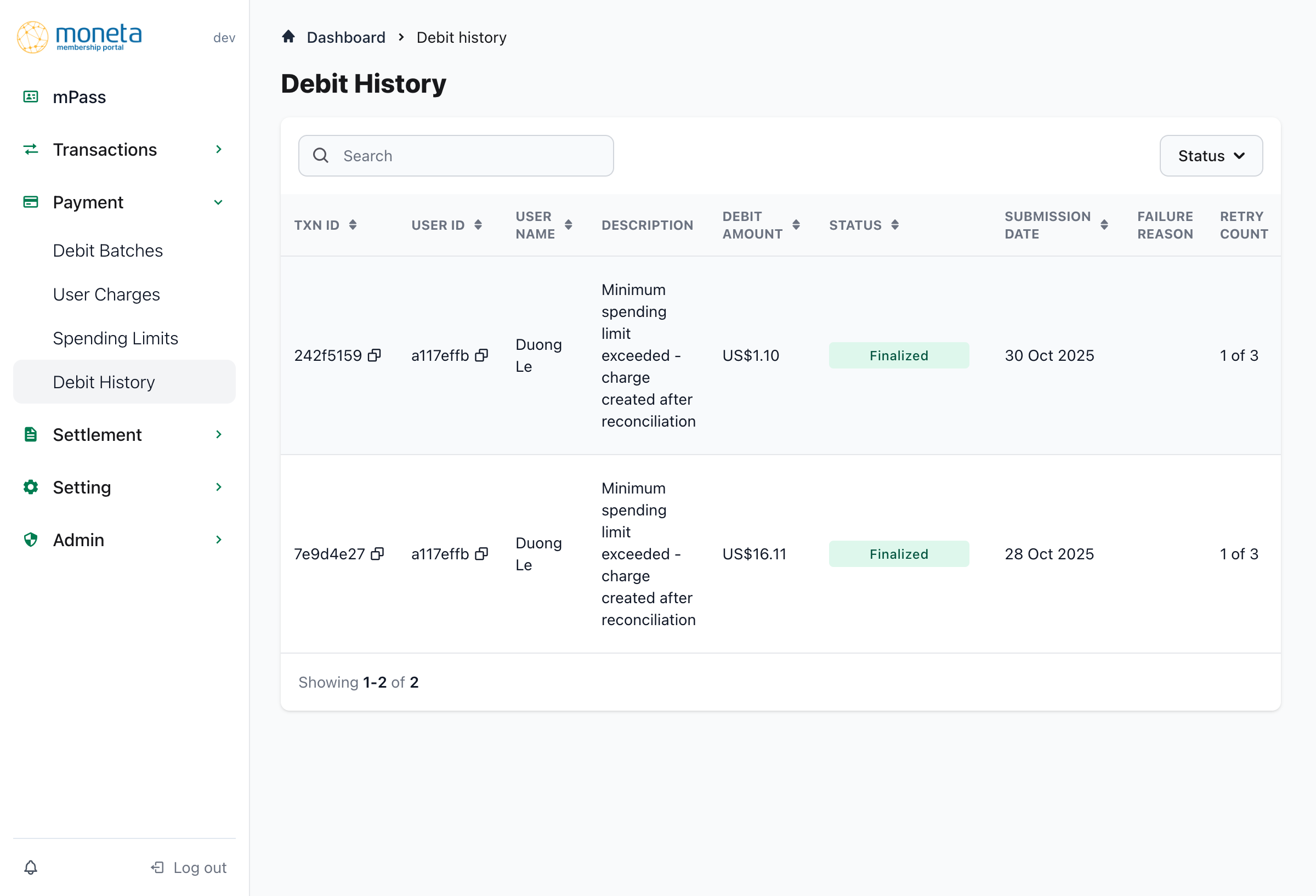
The Debit History section provides granular tracking of individual debit attempts, offering detailed visibility into the retry mechanism, failure reasons, and scheduling of future attempts.
1. Navigation and Interface:
- Page title: "Debit History" clearly identifying the transaction-level view
- Breadcrumb navigation: Easy return to Dashboard and other sections
- Search and filter: Comprehensive search with Status filtering capability
2. Search and Filtering:
- Search functionality: Find specific debit attempts by various criteria
- Status filter: Filter by debit attempt status for focused analysis
- Real-time results: Immediate filtering and search results
3. Debit Transaction Details Table:
Comprehensive tracking information for each debit attempt:
Transaction Identification:
- TXN ID: Unique transaction identifier with copy functionality
- User ID: Unique user identifier with copy functionality
- User name: Human-readable user identification (e.g., "Duong Le")
Transaction Information:
- Description: Detailed reason for the debit attempt:
- "Minimum spending limit exceeded - charge created after reconciliation"
- Provides context for why the debit was initiated
- Debit amount: Amount being debited, displayed in USD format
Processing Status:
- Status: Current processing status:
- "Finalized": Successfully completed transaction
- Other statuses indicate various processing states
- Submission date: When the debit attempt was initiated
- Failure reason: Detailed explanation when transactions fail (currently empty for successful transactions)
Retry Management:
- Retry count: Current retry attempt vs. maximum allowed (e.g., "1 of 3")
- Next retry: Scheduled date and time for the next retry attempt
- Format: "DD MMM YYYY HH:MM" (e.g., "30 Oct 2025 09:22")
- Provides precise scheduling information for failed transactions
4. Retry Mechanism Insights:
The debit history provides detailed visibility into the system's retry logic:
- Retry tracking: Clear indication of current retry attempt out of total allowed
- Scheduling: Precise timing for next retry attempts
- Failure analysis: Detailed failure reasons when transactions don't succeed
- Status progression: Track how individual debits move through different states
5. Administrative Benefits:
- User-level tracking: Connect payment issues to specific users
- Pattern identification: Identify recurring issues or problematic scenarios
- Proactive management: Anticipate upcoming retry attempts
- Audit trail: Complete historical record of all debit attempts
Key System Features
1. Payment Collection Process
The system handles payment collection through the following steps:
- Initial auto-debit attempt during settlement
- Recording of payment failures with detailed error information
- Automated retry process based on defined schedule
- Tax calculation and retention regardless of payment status
2. Retry Mechanism:
The system implements a comprehensive retry mechanism for failed payment attempts:
- First retry: 24 hours after initial attempt
- Second retry: 3 days after first retry
- Third retry: 7 days after second retry
- Maximum attempts: 3 total attempts before permanent rejection
3. Status Tracking:
Multiple status levels provide granular visibility:
- Charge level: Individual charge status (Temp rejected, Finalized, Permanent rejected)
- Batch level: Batch processing status (Processed)
- Transaction level: Individual debit attempt status (Finalized)
4. Financial Management:
- Separation of concerns: Clear distinction between unpaid transactions and spending limit charges
- Amount tracking: Precise financial amounts at every level
- Success rate monitoring: Percentage-based success tracking for performance analysis
5. User Experience:
- Copy functionality: Easy copying of IDs and reference numbers
- Search capabilities: Comprehensive search across multiple criteria
- Filter options: Multiple filtering options for focused analysis
- Navigation: Intuitive breadcrumb and sidebar navigation
Integration with Other Systems
The User Payment Management system integrates seamlessly with other MO system components:
1. Transaction Management:
- Links individual charges to consumption transactions
- Provides payment context for transaction disputes
- Supports transaction reconciliation processes
2. Settlement Management:
- Feeds successful payment data into settlement calculations
- Provides reconciliation data for financial reporting
- Supports billing cycle closure processes
3. User Management:
- Links payment attempts to specific mPass users
- Enables user-specific payment history analysis
- Supports user account status management
This comprehensive payment management system ensures membership organizations have complete visibility and control over their payment processing operations, from individual charge attempts through batch processing to detailed historical tracking and retry management.
Created: 2025-11-03
Last Updated: 2025-11-03